
(610)-714-1741


SimpleMiner
The idea behind this project was to make a Minecraft clone. This was one of my earliest projects and so working on this was a real challenge in terms of getting the architecture and the feel right. From perlin noise landscapes to use of vertex buffer objects to implementing RLE to save and load game states and block/chunk data, was very new to me. This entire project was a very big step in the forward direction, my very first 3D project made on my own engine.
Features
-
7 types of blocks
-
Grass
-
Dirt
-
Air
-
Gravel
-
Glow Stone
-
Water
-
Sand
-
-
Seamless - Endless terrain
-
Huge persistent world
-
Skybox
-
Ability to dig and place any kind of blocks
-
Minecraft like propagation lighting
-
Water rendering
-
Ability to swim on water
-
Variable friction for different types of blocks
-
Frustum culling
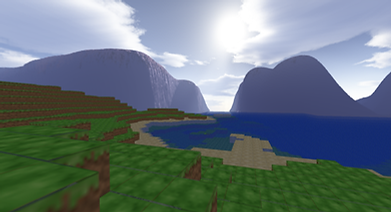

Seamless-endless terrain
The most fundamental thing the world is made out of are blocks, blocks combine to give chunks and chunks then combine to give the world as we see it. To build an endless world that is seamless: -
-
We can use a 2D perlin noise over the entire landscape so get variance in height of each column of blocks in the world.
-
We can then construct our chunk using this variance as "how many blocks of land I have in the column" and then fill the rest with either air blocks.
-
Building on that, air blocks on or below sea level are then made water blocks to get water bodies in our world.
Digging and placing Blocks
Digging involves doing a simple step and sample raycast out from the camera's center. if the raycast hits a block that can be dug then that block is simply changed into an air type block.
Placing works almost the same, but the raycast done places a block on/besides/under the selected face of the block the player is trying to place a block on/besides/under.


Skybox
This is a simple implementaion of a skybox where I'm using 6 images for each side of the cube map and creating a texture cube out of it. Once the SRV is set all you have to do is draw a cube that covers your NDC space and sample the texture cube for all vertexes of that cube.
Light Propagation
Each block stores a light value from 0 (darkest) to 15(brightest) and they use the light value of their neighboring blocks to light their faces. Blocks with nonzero light values propagate light into its neighboring non-opaque blocks, equal to 1 less of their light value.
for a detailed explanation of the algorithm click here.


Water Rendering
Rendering non-opaque objects work a little different than just rendering opaque objects. Since rendering in this project is done though painter's algorithm, we draw non-opaque blocks from farthest to nearest to get proper blending for translucent bodies like water bodies.
Swimming
Based on Archimidies principal. buoyant force gets applied to the player according to how much of the player's body is in water. This gives a very cool floating effect and lets the player swim.


Variable Friction
Each block has it's own friction value which is then taken into consideration when doing physics updates. the friction value is chosen according to what block the player is standing on, specifically where the center of the bottom cylinder is.
Frustum Culling
Frustum culling basically lets the application ignore rendering things that are behind the camera (which the player is definitely not going to see this frame) i.e we try to make sure we're only rendering chunks that are in field of view of the player.
Since we are determining the visibility according to dot product of corners of the chunk, we will have to ask the application to render closer chunks manually since the dot product on chunk corners will give false negatives for closer chunks.
